Hello Developers,
EXTENSION DESCRIPTION
I have created an ESC/POS Thermal Printer Extension. This can print text, images, lines and QR codes. I have noticed a high level of community interest in this functionality but have not yet received any responses.
So, I’m happy to share this extension which can print at a very affordable price.
Blocks
Check for is bluettoth is Enabled or not

Open System Settings (Directly to Bluetooth Page)

Check for is device has nearby devices Permission

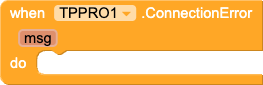
In All the Actions if you Encounter any errors it will identify and let in msg format
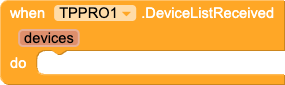
List the Available devices which are already connected in your Device

Once Device get All connected bluetooth devices you can show it in any list view components
(If you don’t see any device listed please go to your bluetooth settings and connect the device first then you can see the device here)
Once you click on any Printers from avaible devices and get address from it and give ConnectTP it will try to connect with the Printer

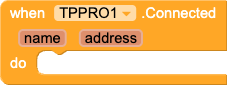
If Your Device Connects to the Printer You can show device name and address using this event
Using this block you can check if the printer is connected your device or not

Using this block you can disconnect from the connected device

This event will fire if the printer is disconnected

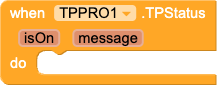
This block will send some signals to your printer and checks if the printer is on or off

Once the TPPower gets the data it will fire this event so you can check is device on or you can turn it on
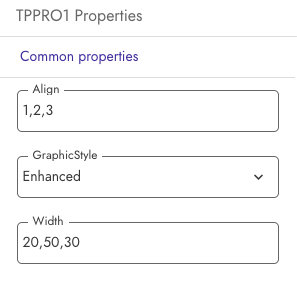
Properties for Print Block & Image Block
Align
1=Left 2=center 3=Right
Width (in Pecentage)
10%=10, 20%=20, 50%=50, etc.
Ex:
Align = 1,2,3
width = 20,50,30
Text prints like this

Graphic Style
Enhanced = Adds more contrast to images and print
Standard = Prints same exact as pictures
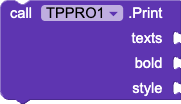
Print Text from List Incl. Bold & style properties
Ex.
texts= (item1,item2,item2)
bold= true / false
style= 1/2/3/4/5 (1=extrasmall, 2=small, 3=medium, 4=large, 5=extralarge)
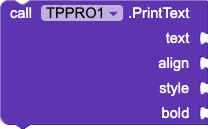
Print Text
text= Dummy Text
align= 1/2/3 (1=Left 2=center 3=Right)
style= 1/2/3/4/5 (1=extrasmall, 2=small, 3=medium, 4=large, 5=extralarge)
bold= true/false
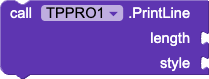
Print Line
Length= Number of Characters (32 is defualt for 2inch printers)
Style= 1/2/3 (1=Single line, 2=Double line, 3=Dashed lines)
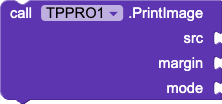
Print Image with 4 sides Margin & mode (1.Line & 2.Graphic)
Ex.
src= (logo.png) From Image Picker/Image Component/Assest Library/URL/Activity Starter,etc.
margin= 20 ( it will give 20px margin to all 4 sides)
Mode= Line / Graphic (in Graphic you can change properties of Graphic style [Enhanced/Standard])
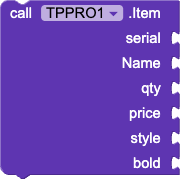
optional print item block
Ex. (print 1 list after another)
Serial= 1 (Serial Numbers [1,2,3,4])
Name= item1
Qty= 10
Price= 100
style= 2
bold= false
Output result

This is a Paid Version of Extension please feel free to contact us on [email protected] we will respond to you ASAP
What’s included with the extension?
• TPPRO.aix
• An .aia for simple understanding of the extension
Demo Apk
Please test this apk to make sure your printer works with this extension before purchasing.
(Min API Level 31 = Android 12 and Later).
TP_PRO.apk (6.1 MB)
This demo was made with Kodular, when you do your testing make sure you grant the requeried bluetooth permissions. If you can’t allow permission at any point please go to the
App settings > permissions > Nearby devices
and allow it. Alternatively, you can try reinstalling the app.
Purchase
New price:
₹ 500
to Purchase Please contact us on [email protected]