 FBRealtimeDatabase – Extension
Package: com.fbrealtimedatabase
Version: 1
Description: Firebase Realtime Database extension which simplifies REST API calls
1. Overview
This extension allows you to store, read, delete and list data from Firebase Realtime Database using REST API.
Supports auth token and dynamic Firebase paths.
2. Properties
-–
 DatabaseUrl (String)

Firebase database URL.
Example:
https://your-app-default-rtdb.firebaseio.com
-–
ProjectBucket (String)

Top-level folder where all data is stored.
Examples:
Users
Users/India
DeviceData
-–
AuthToken (String)

Authentication token appended as ?auth=TOKEN.
If Firebase rules are "admin write
only," this token is required.
3. Functions
-–
 AddChild(tag, key, value)
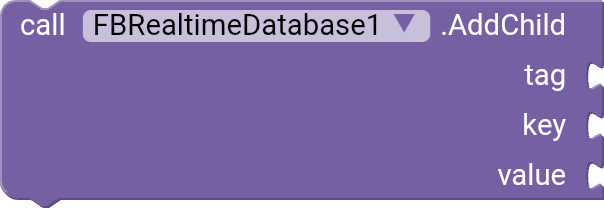
Stores a value at ProjectBucket/tag/key
Example:
AddChild(“DEVICE1234”, “Username”, “XYZ”)
Fires Event:
StoreKeyValueDone(success, response)
-–
GetTagList()

Returns all child keys inside ProjectBucket.
Fires Event
TagListReceived(list)
-–
GetValue(path)

Reads content from the given path inside project bucket.
_Example input:_
DEVICE1234/userName
Fires Event
ValueReceived(path, rawValue)
-–
RemoveValue(path)

Deletes the value at:
ProjectBucket/path
Fires Event
RemoveValueDone(path, success, response)
-–
4.Events
-–
 StoreKeyValueDone(success, response)

Called after AddChild completes.
-–
TagListReceived(tagList)
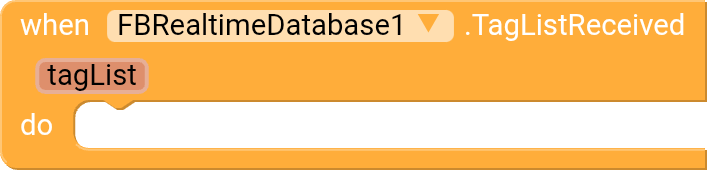
Returns all child keys of ProjectBucket.
-–
ValueReceived(path, rawValue)

Returns value received from GetValue. tag value or key value.
-–
RemoveValueDone(path, success, response)

Called after Delete operation is completed.
-–
FirebaseError(functionName, errorMessage)

Fired when any Firebase request fails.
-–
5. Usage Examples
-–
* Initialize Extension*
FB.DatabaseUrl(“https://your-app.firebaseio.com”)
FB.ProjectBucket(“Users”)
FB.AuthToken(“YOUR_SECRET_TOKEN”) // optional
-–
Store Data
FB.AddChild(“DEVICE1234”, “userName”, “XYZ”)
tag:DEVICE1234, key: userName, value:XYZEvent:
StoreKeyValueDone(success, response)
-–
Read Data
FB.GetValue (“tag/key”) or (“tag”)
Event:
ValueReceived(path, rawValue)
-–
Delete Data
FB.RemoveValue(“tag/key”) or (tag)
Event:
RemoveValueDone(path, success, response)
-–
Get All Nodes
FB.GetTagList()
Event:
TagListReceived(tagList)
AIX Download :-
FBRealtimeDatabase.aix (17.4 KB)
 If you love it, buy me a coffee
