A non-visible component that lets you integrate Firebase Authentication (email/password) into your App Inventor, Niotron, Kodular, or other AI2-based apps without writing Java code.
 Features
-
 Sign Up / Sign In with Email & Password
 -
 Change Password (requires current ID token)
 -
 Change Email (requires current ID token)
 -
 Refresh ID Token
 -
 Send Email Verification
 -
 Check Email Verification Status
 -
 Delete Account
 -
 Reset Password (send password reset email)
 -
 Exposes both Local ID and ID Token to your blocks
All operations use Firebase’s REST Web API; no Google Play Services dependency.
Designer Properties
| Property Name | Type | Description |
|---|---|---|
| ApiKey | Text | Your Firebase project Web API Key (from Firebase Console → Project Settings). |
| SignedInLocalId | Readonly | The user’s local UID returned by Firebase after sign in. |
| SignedInIdToken | Readonly | The user’s current ID Token returned by Firebase after sign in. |
 Blocks
Authentication
| Block | Inputs | Output / Event |
|---|---|---|
| SignUp(email, password) | Email, Password | Fires SignUpSuccess(email, idToken, localId) or SignUpFailed(errorJson) |
| SignIn(email, password) | Email, Password | Fires SignInSuccess(email, idToken, localId) or SignInFailed(errorJson) |
| SendVerificationEmail(idToken) | idToken (from sign in) | Fires VerificationSent(email, idToken) or VerificationFailed(errorJson) |
| CheckEmailVerificationStatus(idToken) | idToken | Fires EmailVerifiedStatus(verified) |
Account Management
| Block | Inputs | Output / Event |
|---|---|---|
| ChangeEmail(idToken, newEmail) | idToken, newEmail | Fires ChangeEmailSuccess(oldEmail, newEmail, response) or ChangeEmailFailed(errorJson, oldEmail, newEmail) |
| ChangePassword(idToken, newPassword) | idToken, newPassword | Fires ChangePasswordSuccess(oldPassword, newPassword, response) or ChangePasswordFailed(errorJson, oldPassword, newPassword) |
| RefreshToken(refreshToken) | Refresh token | Fires RefreshTokenSuccess(responseJson) or RefreshTokenFailed(errorJson) |
| DeleteAccount(idToken) | idToken | Fires DeleteAccountSuccess(email) or DeleteAccountFailed(errorJson) |
| SendPasswordResetEmail(email) | Fires ResetPasswordSuccess(email) or ResetPasswordFailed(errorJson) |
 Events
-
SignUpSuccess(email, idToken, localId)
-
SignUpFailed(errorJson)
-
SignInSuccess(email, idToken, localId)
-
SignInFailed(errorJson)
-
VerificationSent(email, idToken)
-
VerificationFailed(errorJson)
-
ChangeEmailSuccess(oldEmail, newEmail, response)
-
ChangeEmailFailed(errorJson, oldEmail, newEmail)
-
ChangePasswordSuccess(oldPassword, newPassword, response)
-
ChangePasswordFailed(errorJson, oldPassword, newPassword)
-
RefreshTokenSuccess(responseJson)
-
RefreshTokenFailed(errorJson)
-
EmailVerifiedStatus(verified)
-
DeleteAccountSuccess(email)
-
DeleteAccountFailed(errorJson)
-
ResetPasswordSuccess(email)
-
ResetPasswordFailed(errorJson)
All
errorJsonstrings are the raw JSON returned by Firebase (no parsing) so you can inspecterror.messagein your blocks.
 Usage Example
-
Drag the component into your project.
-
Set ApiKey to your Firebase Web API Key.
-
On a Sign Up button click:
when Button1.Click
    call EmailAuth1.SignUp(TextBoxEmail.Text, TextBoxPassword.Text)
- Handle success:
when EmailAuth1.SignUpSuccess do
    set Label1.Text to join "Signed up: " email
    set global IdToken to idToken
- Later use
global IdTokento change password, change email, or delete the account.
Blocks
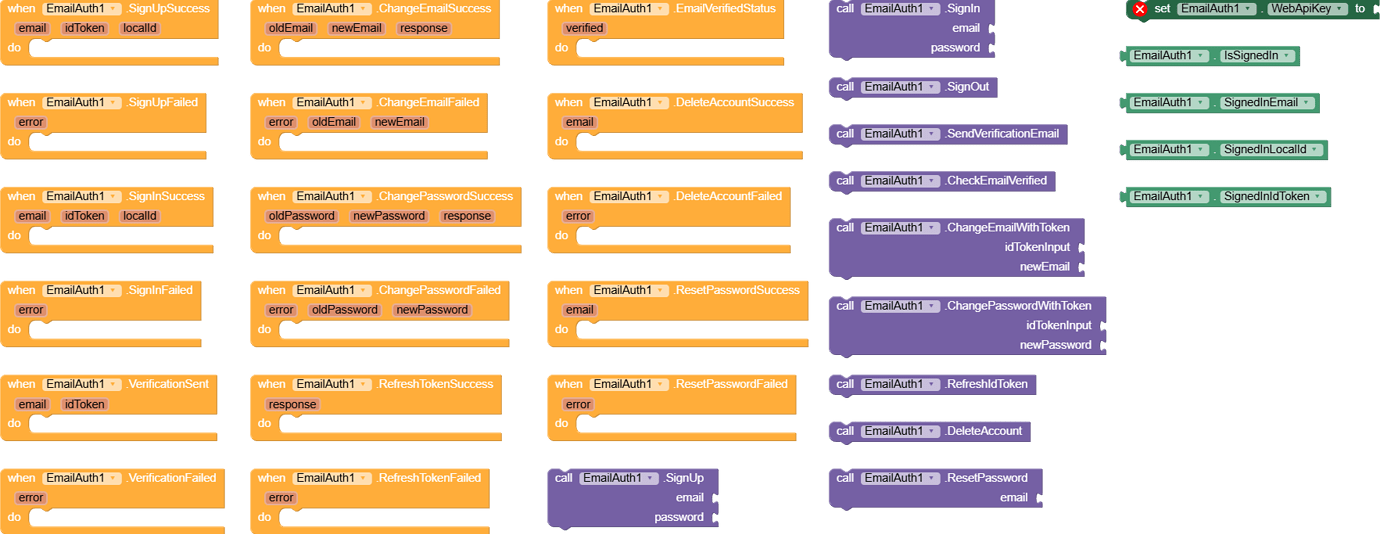
Download AIX :
com.tricky.emailauth.aix (14.1 KB)